logo
家へ
製品
わたしたち に つい て
工場ツアー
品質管理
連絡 ください
見積依頼
ニュース
ブログ
ホーム ブログ

25pin Interface Technology Declines As Modern Alternatives Rise

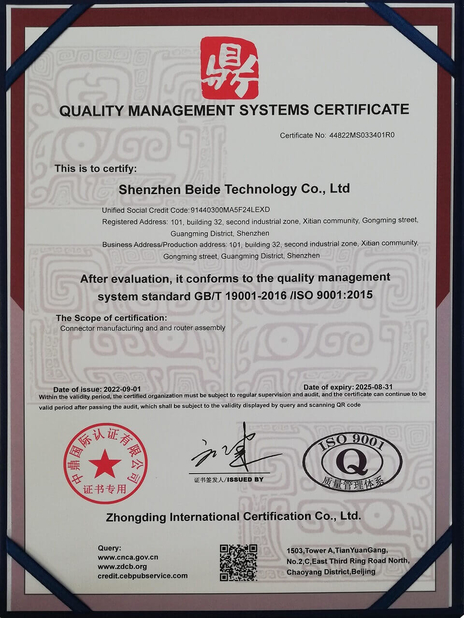
認証
中国 DONGGUAN BEDE MOLD AND PLASTIC FRODUCTS CO., LID 認証
顧客の検討
こんにちは エリッサ 去年の初め 私の同僚が 20本の電線を 注文しました あなたの会社で作ったケーブルは かなりうまく機能しました 私はあなたの会社を使って 将来 このようなケーブルを もっと生産することに興味があります

—— マシュー・ゲッツマン

競争力のある価格,高品質のサービス,私たちは長期間あなたと協力します!

—— ドンゲク・イリア

オンラインです
会社 ブログ
25pin Interface Technology Declines As Modern Alternatives Rise
最新の会社ニュース 25pin Interface Technology Declines As Modern Alternatives Rise

Imagine computer rooms in the 1990s, filled with the scent of ink and the rhythmic hum of printers, as data raced through thick cables. Connecting computers to printers was the indispensable D-shaped parallel 25-pin interface. Once a hero of data transfer that witnessed the rapid development of computer technology, it has gradually faded from view, becoming a footnote in history. Let us revisit this technological past, explore the rise and fall of the parallel 25-pin interface, and look ahead to future connectivity trends.

Chapter 1: The Birth and Development of the Parallel 25-Pin Interface – Centronics' Legacy
1.1 The Origins of the Centronics Interface: A Revolution in Printer Connectivity

The parallel 25-pin interface, also known as the Centronics interface, was a parallel communication standard popularized by Centronics Corporation in the 1970s. As a leading printer manufacturer at the time, Centronics developed this interface to solve data transfer challenges between printers and computers. Its introduction significantly improved data transfer speeds, enabling faster printing of documents and images, which dramatically enhanced office productivity. The success of the Centronics interface established its dominance in printer connectivity.

1.2 Structure and Principles of the Parallel 25-Pin Interface: The Secrets of Parallel Transmission

The interface used a 25-pin D-sub connector with multiple data lines, control lines, and ground wires. Data lines transmitted information, control lines managed transfer direction and timing, while ground wires provided stable reference voltage. Parallel transmission meant multiple bits traveled simultaneously across separate lines, theoretically offering faster speeds than serial alternatives. This mechanism allowed the Centronics interface to achieve relatively high data rates, meeting the needs of printers and other peripherals.

1.3 The Centronics Cable: Bridging Computers and Peripherals

The accompanying Centronics cable featured a Centronics connector for peripherals (typically printers) and a DB25 connector for the computer's parallel port. This configuration became ubiquitous during its era, with nearly all printers adopting the interface. Cable quality directly impacted transmission stability and speed, making high-grade Centronics cables essential for reliable printer operation.

Chapter 2: Advantages and Limitations of Parallel Transmission – A Double-Edged Sword
2.1 Advantages: High Bandwidth and Speed

The parallel interface's simultaneous multi-bit transmission provided greater bandwidth than serial alternatives, particularly beneficial for printing large documents or high-resolution images where speed was critical.

2.2 Limitations: Distance, Configuration, and Compatibility

However, parallel transmission had inherent drawbacks. Cable length restrictions caused signal degradation over distance, while complex IRQ (Interrupt Request) and DMA (Direct Memory Access) settings often led to conflicts. The interface also lacked plug-and-play convenience, requiring manual configuration for each new device.

2.3 IRQ and DMA: Configuration Challenges

IRQ allowed hardware to signal the CPU for data transfers, while DMA enabled direct memory access without CPU intervention. Parallel ports required proper IRQ and DMA channel assignments, but limited system resources and potential conflicts made configuration problematic for users.

Chapter 3: Applications – From Mainstream to Niche
3.1 Printers: The Golden Age

Before USB dominance, parallel interfaces connected printers, scanners, and external storage devices. Printers were the primary application, leveraging parallel bandwidth for rapid document and image output.

3.2 Scanners and Storage: Extended Uses

Scanners relied on parallel speeds for image transfer, while early external storage devices like tape drives benefited from faster data exchange compared to serial alternatives.

3.3 Industrial Control and Legacy Maintenance: Final Strongholds

Though obsolete in consumer electronics, parallel interfaces persist in industrial controls and legacy equipment maintenance where reliability remains valuable. Some aging industrial machines still use parallel communication, necessitating continued interface support.

Chapter 4: Data Transfer Rates – Past Glory
4.1 Theoretical Speeds: The Upper Limit

Parallel interfaces typically achieved 50KB/s to 2MB/s, though actual rates varied by implementation and device capability. High-end printers pushed these limits for faster output.

4.2 Rate Influencers: Cables and Hardware

Cable quality, device performance, and driver optimization affected real-world speeds. Superior cables minimized signal loss, while capable hardware and efficient drivers maximized throughput.

4.3 Modern Comparisons: A Different Era

Once sufficient for printers, parallel speeds pale against USB 2.0 (480Mbps) and USB 3.0 (5Gbps), highlighting technological evolution.

Chapter 5: USB's Rise – Parallel's Twilight
5.1 USB Advantages: Plug-and-Play, Speed, and Expandability

Universal Serial Bus (USB) revolutionized peripheral connectivity with:

  • Automatic configuration (no manual IRQ/DMA settings)
  • Far superior speeds (USB 2.0 at 480Mbps, USB 3.0 at 5Gbps)
  • Easy expansion via hubs
  • Power delivery for low-energy devices
5.2 USB Dominance: Parallel's Obsolescence

These advantages made USB the new standard, rendering parallel interfaces obsolete in mainstream applications.

5.3 USB Evolution: Speed Advancements

From USB 1.0 (1.5Mbps) to USB4 (40Gbps via Thunderbolt), continuous improvements have solidified USB's dominance.

Chapter 6: Parallel-to-USB Adapters – Legacy Lifelines
6.1 Adapter Functionality: Signal Conversion

Adapters convert parallel signals to USB, enabling legacy device connections to modern computers. Built-in drivers facilitate communication with contemporary operating systems.

6.2 Compatibility Limitations

Not all parallel devices work flawlessly with adapters; compatibility varies by manufacturer and model.

6.3 Driver Importance

Proper driver installation is crucial for adapter functionality, as they mediate communication between old hardware and modern systems.

Chapter 7: Modern Alternatives – Faster Options
7.1 Ethernet: Networked Peripherals

Network-connected printers and scanners benefit from Ethernet's speed and distance capabilities.

7.2 Wi-Fi: Wireless Convenience

Wireless networking eliminates cables entirely, enabling flexible device placement and mobile access.

7.3 Thunderbolt and DisplayPort

Thunderbolt delivers ultra-high speeds (up to 40Gbps) for premium peripherals, while DisplayPort specializes in high-resolution video.

Chapter 8: Usage Considerations – Final Notes
8.1 Cable Length Matters

Shorter parallel cables reduce signal degradation for more reliable transfers.

8.2 Compatibility Verification

Ensure device and port standards match to avoid connection issues.

8.3 Driver Installation

Correct driver setup is essential for proper parallel device operation.

Chapter 9: The Legacy – Connectivity's Evolution
9.1 Historical Context: Serial, SCSI, and Proprietary Interfaces

The parallel interface existed alongside RS-232 serial, SCSI, and manufacturer-specific connections, each serving different speed and complexity needs.

9.2 Parallel vs. Serial: Tradeoffs

Parallel offered speed through multiple data lines but increased complexity, while serial provided simplicity at lower speeds.

9.3 The Future: Faster, Smarter, Wireless

From parallel to serial, wired to wireless, connectivity progresses toward greater speed, convenience, and intelligence. Emerging technologies like wireless charging and high-speed data transfer without cables point to a cordless future.

Appendix: Technical Specifications
  • Interface Type: Parallel
  • Connector: 25-pin D-sub
  • Data Rate: 50KB/s - 2MB/s (typical)
  • Voltage: +5V
  • Primary Use: Printers, scanners, and peripherals
パブの時間 : 2026-03-17 00:00:00 >> blog list
連絡先の詳細
DONGGUAN BEDE MOLD AND PLASTIC FRODUCTS CO., LID

コンタクトパーソン: Ms. admin

電話番号: 15915396878

私達に直接お問い合わせを送信 (0 / 3000)